The first challenging part of my Python learning was “FOR statements,” which is used for iterating a sequence (ex., list, tuple, dictionary, and sets) and performing various operations.
If you’re a beginner in Python struggling to handle FOR statements, here I have written an article about how I learned it and what operations can be done using loops with three basic solved examples.
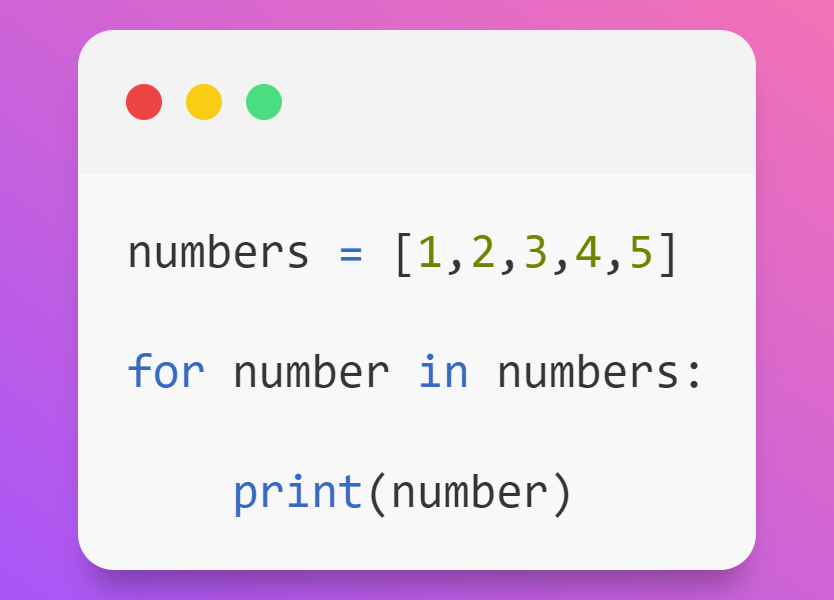
Example 01: Displaying the elements present in the list
Explanation:
Step 1: First, I created a new list of ‘numbers’ whose values are 1,2,3,4 and 5.
Step 2: Next, the ‘numbers’ list was iterated using for loop, and the iterator variable was assigned as the number.
Step 3: In the 1st iteration, the first element, ‘1’, will be taken and assigned to a number variable, and it will move inside the loop and execute the print statement and display ‘1’. Likewise, each iteration took the value in the list one by one using the iterator variable and displayed the variable.
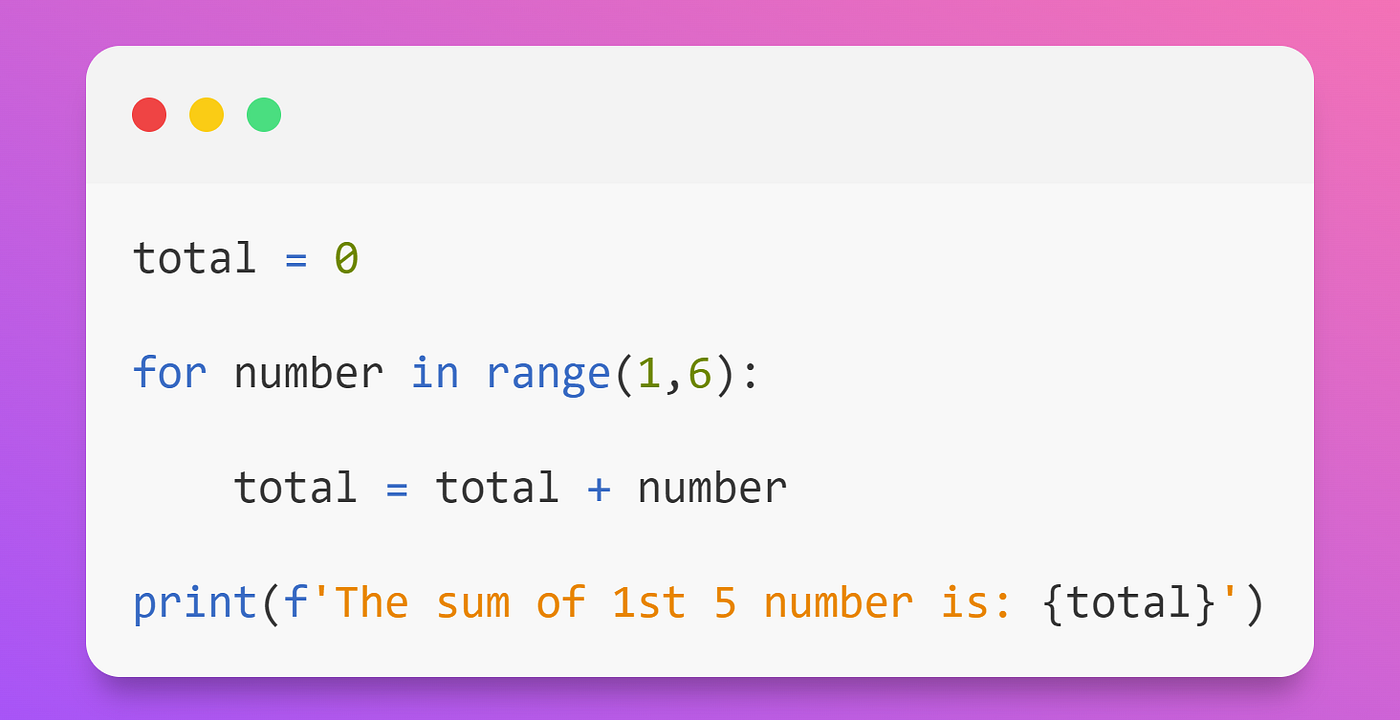
Example 02: Displaying the sum of the first 5 numbers:
Like the previous example, the sequence used is a range function.
The three parameters of the range function. Syntax: range (start, stop, step). The range function is a built-in function that returns the values starting from 0 by default, ending at the previous value of the specified numbers, and increments the value by default 1.
Explanation:
Step 1: Variable ‘total’ initialized to zero and range (1,6) were iterated over a loop. In this, the value starts from ‘1’ and ends at 5 (6 is not inclusive) and will be incremented by default ‘1’.
Step 2: In the 1st iteration, the number variable is assigned to ‘1’. The variable moves inside the loop and is added to the total variable ➡ 0.
(total) + 1 (number) = 1 (total).
In the 2nd iteration, the number = 2 ➡ 1 (total) + 2 (number) = 3 (total),
In the 3nd iteration, the number = 3 ➡ 3 (total) + 3 (number) = 6 (total),
In the 4nd iteration, the number = 4 ➡ 6 (total) + 4 (number) = 10 (total),
In the 5th iteration, the number = 5 ➡ 10 (total) + 5 (number) = 15 (total).
Step 3: Once the condition becomes failed, it comes out of the loop and displays the output as “The sum of 1st five numbers: 15”.
String and data structures also can be iterated using FOR statements.
We can achieve many software requirements by using the combination of conditional statements (IF..ELSE) inside for loop.
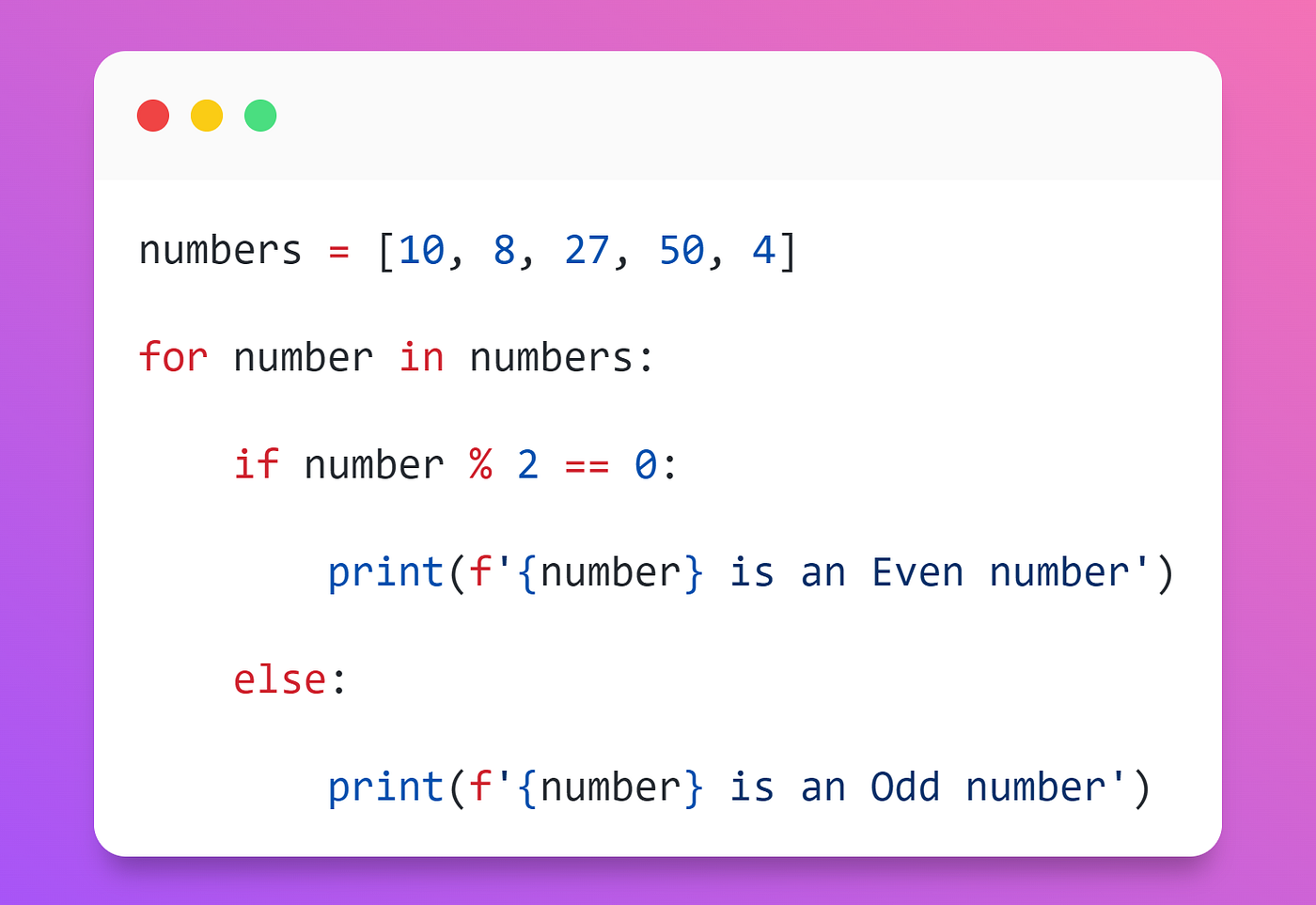
Basic example 03: Displaying odd and even numbers:
Explanation:
Step 1: The numbers list was iterated using them for a loop.
Step 2: In 1st iteration, the 1st element ‘10’ will be assigned to the number variable, and it moves inside the for a loop.
Then it will check with the if condition where the number ‘10’ is divided by ‘2’ and verifies the remainder with ‘0’.
If the condition is TRUE, it will return ’10 as an Even number,’ and then iteration takes place.
Step 3: Similarly, the other elements will be iterated and checked with the if-else conditions and display the output.
Learning strategy:
- First, understand the for loop concept and its syntax.
- Second, note down the values obtained one by one in each iteration.
- Practice and solve problems.
I believe this article would be easy to understand the FOR statement. However, try to practice the codes a couple of times to help you understand the flow more quickly.
Thanks & Regards
Aswin Balamurugan