Unlock the Power of Tables Relationships!
In SQL, Joins are like the glue that holds together different tables in a database, allowing us to combine data from multiple sources to extract the information we need. They’re like the building blocks of queries, enabling us to piece together a complete picture from fragmented data.
When we talk about joins, we usually refer to operations that merge rows from two or more tables based on a related column between them. The most common types of joins are,
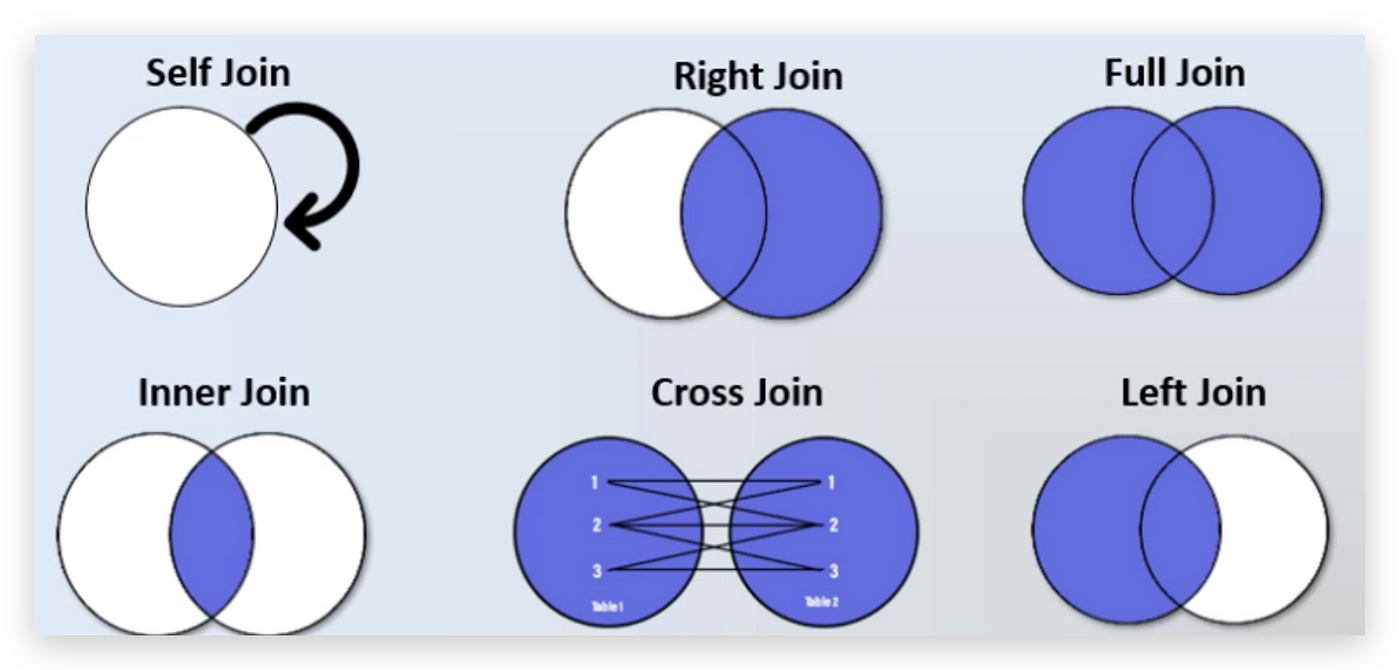
Each type of join serves a specific purpose, with joins we can stitch together data from different tables to answer complex questions, analyze trends, or generate reports. They’re an essential tool in the SQL toolkit, helping us make sense of the wealth of information stored in databases.
Each join has its style of operations which we are going to see in this article in detail.
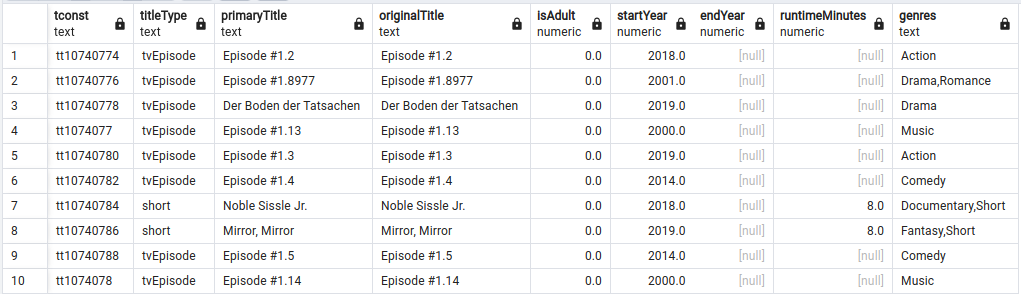
We are going to use two tables which are as follows:
Schema = title
Tabel 1 = rating
Tabel 2 = basics
Table 1:
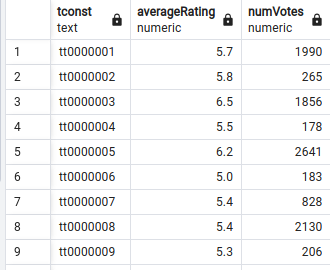
Table 2:
INNER JOIN:
An INNER JOIN is used when we want data that is correlated between each table. This operation will retrieve only the common data between the tables. Other data in each table will not be retrieved unless specified after SELECT.
EXAMPLE:
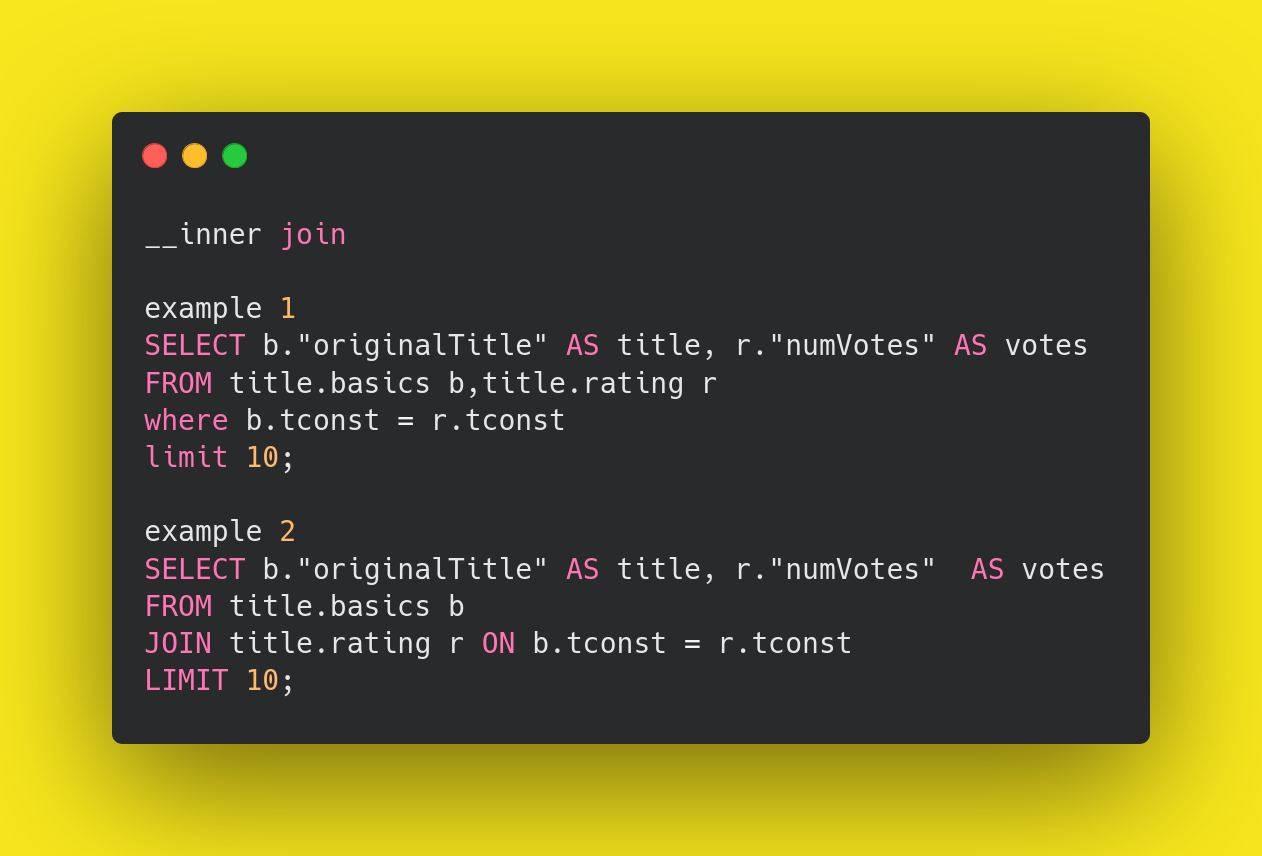
- We are using a comma to perform an implicit inner join between the “basics” and “rating” tables.
- We’re selecting the “originalTitle” column from the “basics” table and aliasing it as “title”.
- We’re selecting the “numVotes” column from the “rating” table and aliasing it as “votes”.
- The WHERE clause specifies the condition for the join, ensuring that rows are matches based on the equality pg the tconst column in both tables
- Finally, we are limiting the rows by 10 using the LIMIT clause.
- We can also use the ON clause with JOIN to do the same operation.both the query performs the same.
OUTER JOIN:
OUTER JOINs are used to bring the matched rows of one table and the unmatched rows of the other table together. We can specify the columns we want after the SELECT, which will retrieve only the specified columns’ data from both tables. OUTER JOINs are a combination of LEFT OUTER JOIN and RIGHT OUTER JOIN.
FULL OUTER JOIN:
FULL OUTER JOIN is used to bring together both the matched and unmatched rows from both tables. This means that all rows from both tables will be included in the result, regardless of whether there is a match.
If there is no match for a row in one table, it will be paired with NULL values from the other table. FULL OUTER JOIN provides a comprehensive view of the data from both tables, ensuring that no information is lost in the join operation.
EXAMPLE:
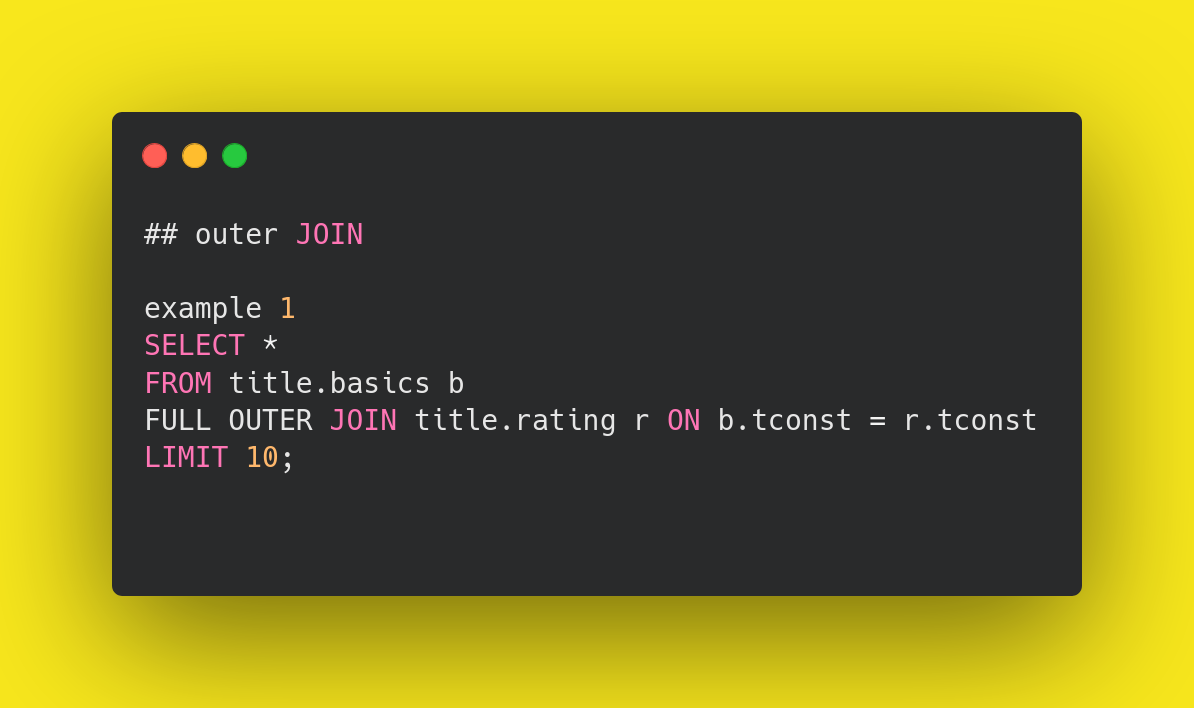
- It selects all columns (*) from the “basics” table, aliased as “b”.
- The query employs a full outer join (FULL OUTER JOIN)to combine data from both “basics” and “rating” tables.
- This ensures that all rows from both tables are included in the result set.
- The join condition specifies that rows from the “basics” table should be matched with rows from the “rating” table based on the equality of the tconst columns.
- The limit of 10 clauses restricts the output to the first 10 rows of the combined result set.
- By utilizing a full outer join, this query produces a result set containing information from both the “basics” and “rating” tables, ensuring that no data is excluded, even if there are no matches between the tables. This can be useful for analyzing data comprehensively or identifying missing relationships between records.
LEFT OUTER JOIN:
LEFT OUTER JOIN is used to retrieve data primarily based on the left table. Any data that doesn’t find a match in the right table will be represented as NULL values.
LEFT OUTER JOIN is also commonly referred to simply as LEFT JOIN. Additionally, it’s important to note that the order of the tables in the join matters: the table specified on the left side of the JOIN keyword is
EXAMPLE:
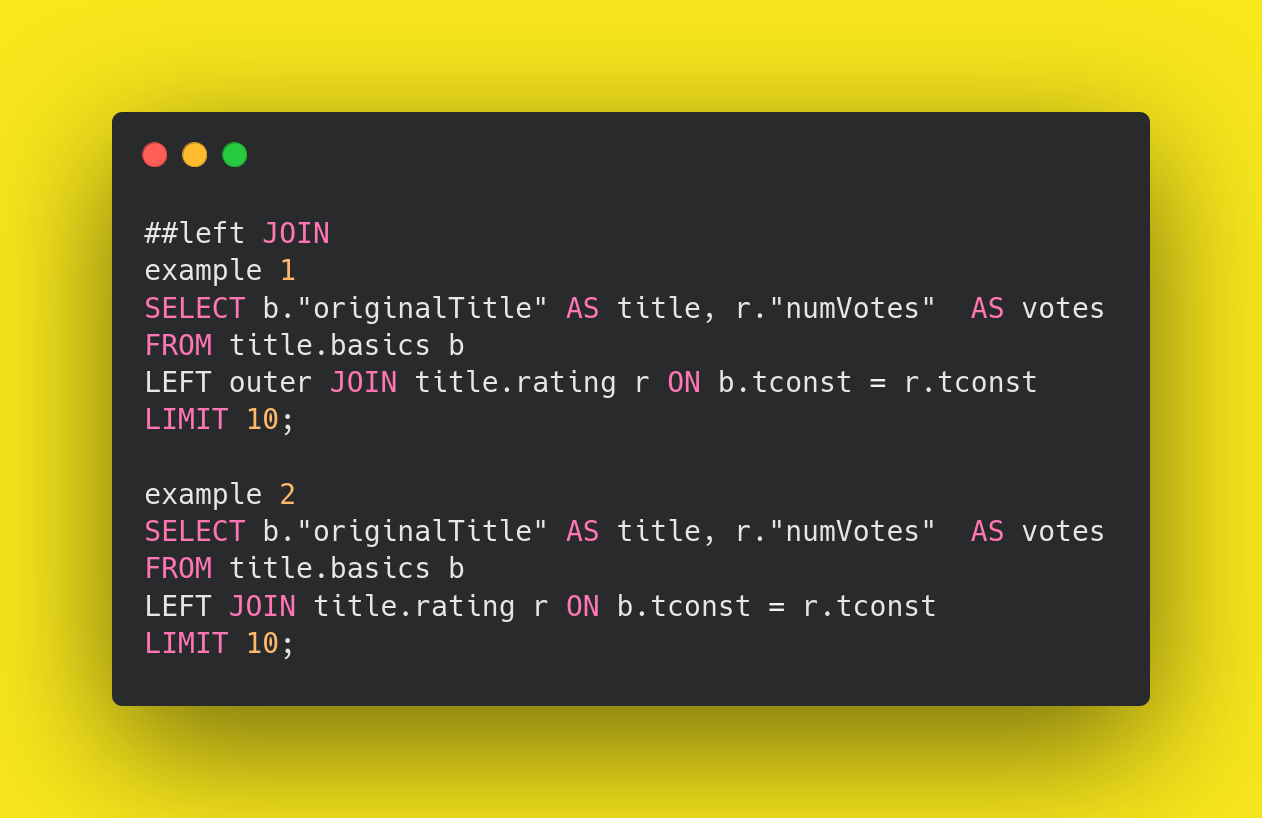
- We are using a comma to perform a left outer join between the “basics” and “rating” tables.
- We’re selecting the “originalTitle” column from the “basics” table and aliasing it as “title”.
- We’re selecting the “numVotes” column from the “rating” table and aliasing it as “votes”.
- The LEFT OUTER JOIN clause specifies the condition for the join, ensuring that rows are matches based on the equality pg the tconst column in both tables
- Finally, we are limiting the rows by 10 using the LIMIT clause.
- The LEFT OUTER JOIN and LEFT JOIN perform the same set of operations we can omit the outer if we want to.
RIGHT OUTER JOIN:
RIGHT OUTER JOIN is the opposite of LEFT JOIN. It is used to retrieve data primarily based on the right table. Any data that doesn’t find a match in the left table will be represented as NULL values.
RIGHT OUTER JOIN is also commonly referred to simply as RIGHT JOIN. Similar to LEFT JOIN, it’s important to note that the order of the tables in the join matters: the table specified on the right side of the JOIN keyword is considered the “right” table, and the one on the left side is considered the “left” table.
EXAMPLE:
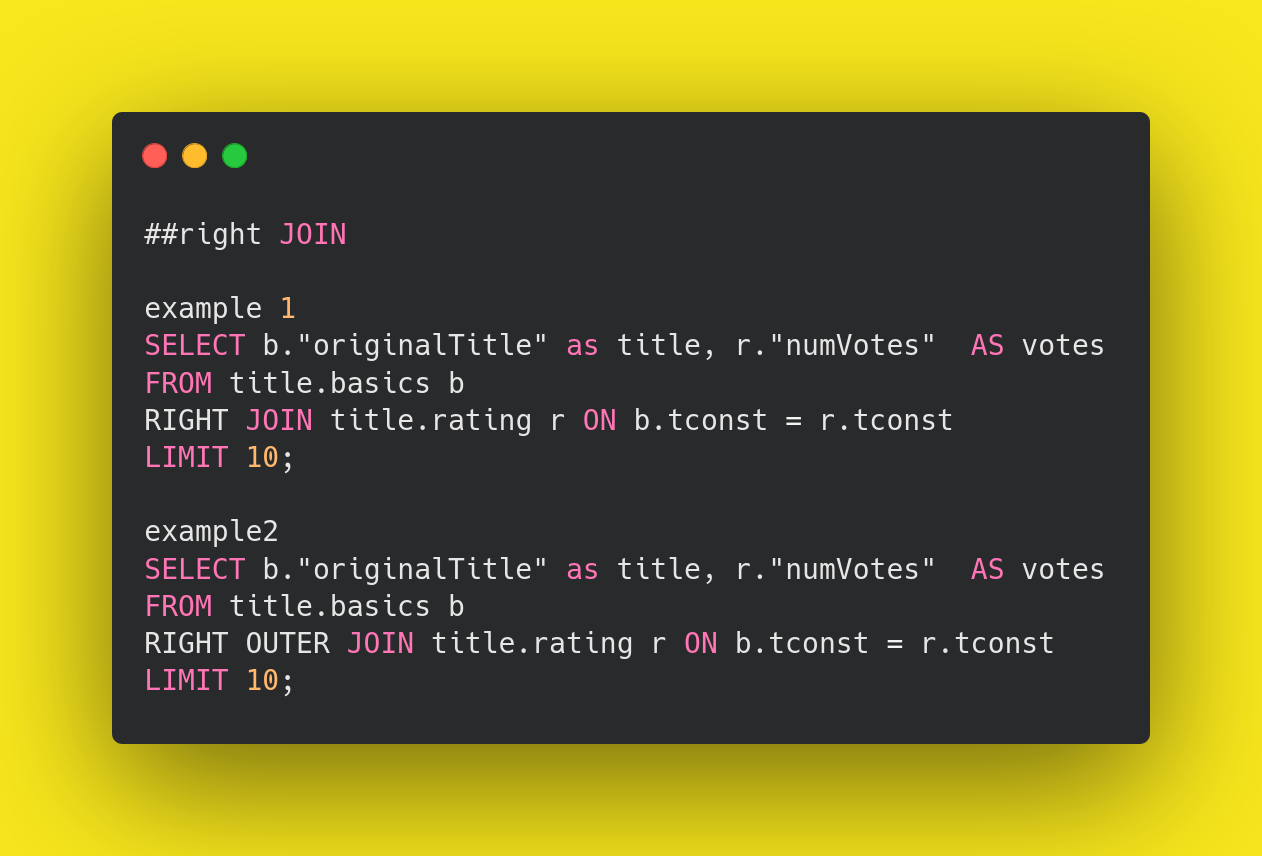
- We are using a comma to perform a right outer join between the “basics” and “rating” tables.
- We’re selecting the “originalTitle” column from the “basics” table and aliasing it as “title”.
- We’re selecting the “numVotes” column from the “rating” table and aliasing it as “votes”.
- The RIGHT OUTER JOIN clause specifies the condition for the join, ensuring that rows are matches based on the equality pg the tconst column in both tables
- Finally, we are limiting the rows by 10 using the LIMIT clause.
- The RIGHT OUTER JOIN and RIGHT JOIN perform the same set of operations we can omit the outer if we want to.
CROSS JOIN:
A CROSS JOIN is one in which each row from one table is combined with each row from another table, resulting in a Cartesian product of the two tables. It is used to relate every record from one dataset to every record in another dataset. CROSS JOINs are mainly used in scenarios where we need to generate all possible combinations of data, such as maintaining databases for employees and students.
However, it’s worth noting that CROSS JOINs are not widely used in practice due to their performance issues. As the size of the tables increases, the number of combinations grows exponentially, which can lead to significant resource consumption and slow query performance. Therefore, CROSS JOINs are used sparingly and with caution in situations where they are necessary.
EXAMPLE:
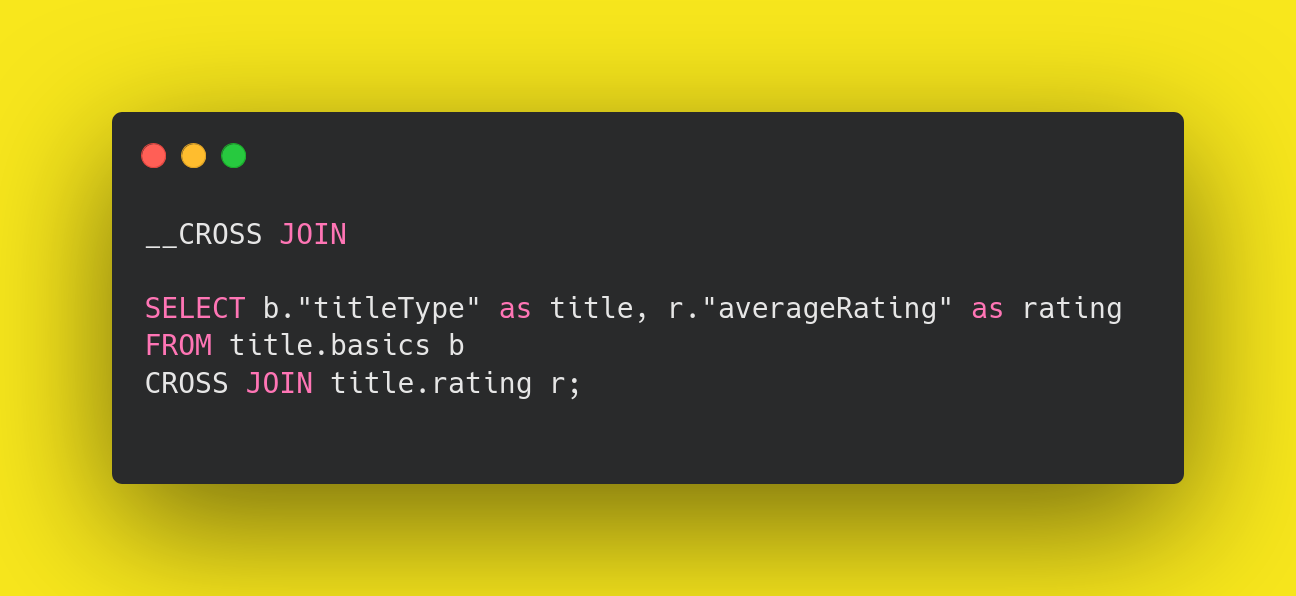
- This is the statement used to retrieve data from the database using SELECT.
- We are selecting the “titleType” from “basics” as “title” and “averageRating” from “rating” as “rating”.
- We are giving alias names for both tables, such as “basics” as “b” and “rating” as “r”.
- Unlike other types of joins, a CROSS JOIN does not require a join condition (ON clause), as it simply combines all rows from both tables.
The result of this query will be a combination of every row from the “title.basics” table matched with every row from the “title.rating” table. Each resulting row will contain the “titleType” from “title.basics” and the “averageRating” from “title.rating”.
SELF JOIN:
A SELF JOIN is used to join a table with itself, allowing us to compare rows within the same table. This can be useful when we need to retrieve data based on relationships within the same dataset.
For example, in a table that stores hierarchical data like employee-manager relationships, we might use a SELF JOIN to compare each employee’s ID with the manager’s ID in the same table to find the manager’s name.
SELF JOINs are particularly handy when we need to compare different rows within the same dataset or when we need to establish relationships between different entities represented within the same table.
Overall, SELF JOINs provide a flexible way to query and analyze data within a single table.
EXAMPLE:
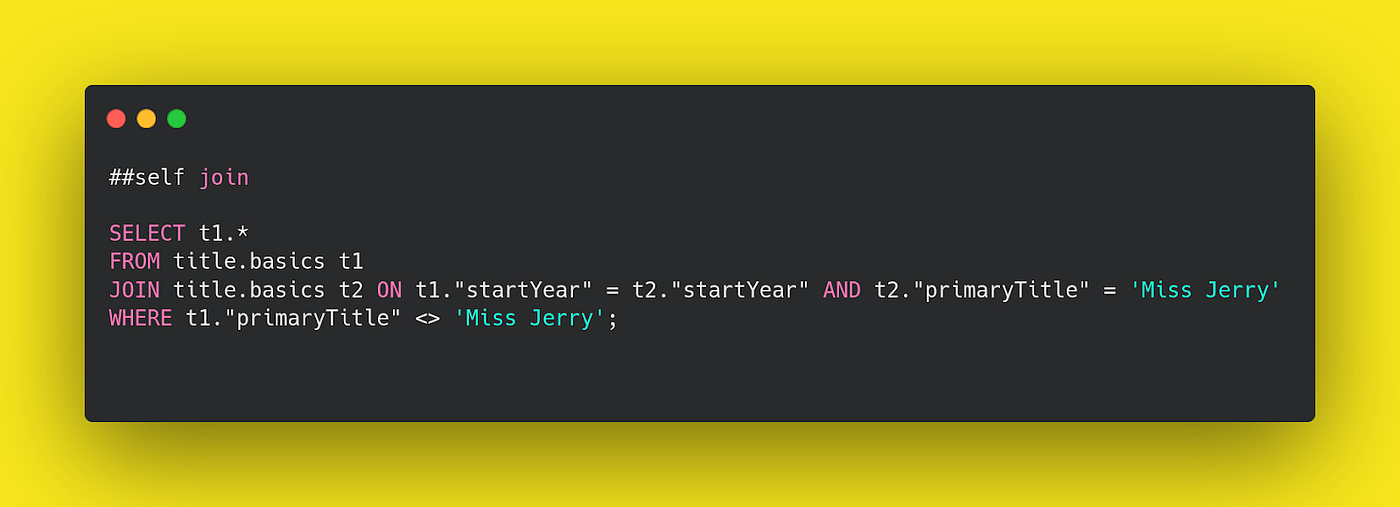
- The “basics” table is referenced twice in the query, and each instance is given an alias. The first instance is aliased as “t1”, and the second instance is aliased as “t2”.
- The query joins the “basics” table with itself based on two conditions:
- The startYear of “t1” must be equal to the startYear of “t2”.
- The primaryTitle of “t2” must be ‘Miss Jerry’.
- The query selects all columns (*) from the “t1” instance of the “basics” table.
- The WHERE clause filters out rows where the primaryTitle of “t1” is not ‘Miss Jerry’. This ensures that “Miss Jerry” itself is excluded from the result set.
- This query essentially retrieves titles from the “basics” table that were released in the same year as “Miss Jerry”, excluding “Miss Jerry” itself.
By understanding and utilizing these join operations effectively, we can perform complex queries, analyze trends, generate reports, and gain valuable insights from diverse datasets.
However, it’s essential to consider the performance implications of certain joins, such as CROSS JOIN, and use them judiciously to avoid resource consumption and slow query performance.
Overall, SQL joins are indispensable tools for managing and extracting meaningful information from relational databases.