The regular expression is commonly known as ‘regex’, ‘re’, or ‘regexp’. It is a powerful tool used to match/find a string pattern and manipulate string.
The funny thing is that I got introduced to Regular expression in a meme by seeing that my expectation skyrocketed at the same time I thought it might give me a hard time, and yes, it did.

Jokes apart. Let’s talk about the regular expression in Python, it can be used by importing a module named ‘re’.
The regular expression is a set of characters with highly specialized syntax. It contains several functions and constants to work with.
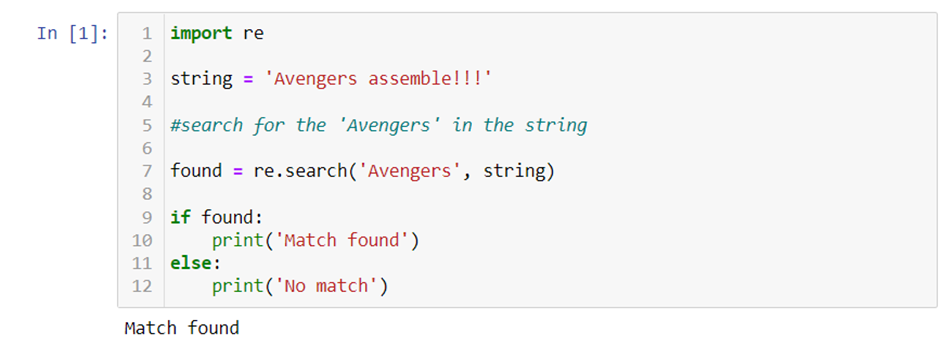
In the above example, I have used re.search(), one of the functions in ‘re’, to search for a pattern in the string. As you can see, the result of the program is ‘Match found’ since it found the pattern in the string we requested. We have several functions like search() in the ‘re’ module, which we will discuss later.
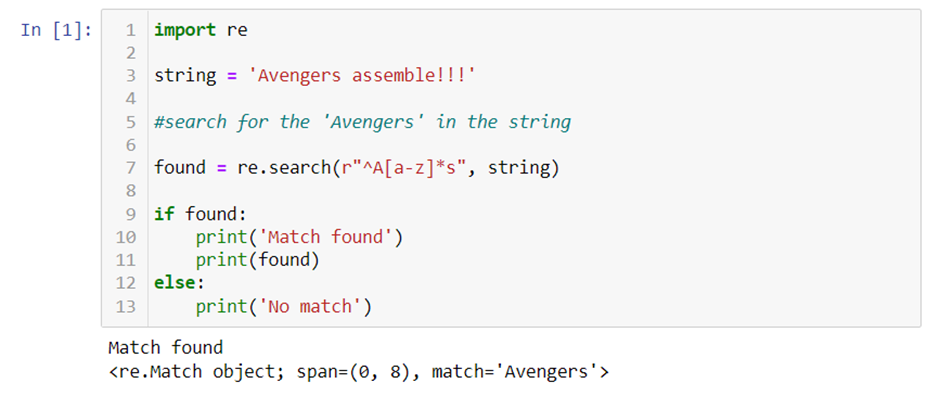
As you can see in the above example, we have used a set of characters to search for a pattern in the string. The characters which we have used are two of a kind, named literal characters and meta characters.
Let us discuss them one by one. First, we will see about commonly used regex functions.
1. search() :
It searches for a specified pattern in a string and returns a match object if the pattern is found we saw in an example in the above-illustrated code.
2. findall():
This function is used to find all the occurrences of a pattern in a string and returns them as a list of strings.
3. split():
As the name says, it is used to split a string at each occurrence of a pattern and returns a list of the resulting substrings.
4. sub():
Substitute it replaces all occurrences of a pattern in a string with a different string.
5. compile():
Compiles a pattern into an object, which can be used for matching. This is useful if you need to use the same pattern multiple times, as it can save time and resources by compiling the pattern once and reusing the compiled pattern.
6. ignorecase():
It is used to perform case-insensitive matching. It is passed as the second argument to various regular expression functions such as search(), findall(), and sub().
To learn more about regex functions, kindly visit — https://docs.python.org/3/library/re.html
Apart from functions, we have Literal characters and Meta characters in the regex module.
Literal Characters:
Characters representing themselves are said to be literal characters in the regex module. For example, the letter ‘k’ is a literal character representing itself in the regular expression.
You can include the character in the match as a literal character in a regular expression. For example, the pattern ‘a’ will match the character ‘a’ in a string.
Meta Characters:
Metacharacters are special characters that have a special meaning. They are used to perform more advanced searches and manipulation with regular expressions.
Here are some common metacharacters and their meanings:
· ‘.’ (dot) matches any single character (except a newline)
· ‘*’ matches zero or more occurrences of the preceding character or pattern
· ‘+’ matches one or more occurrences of the preceding character or pattern
· ‘?’ matches zero or one occurrence of the preceding character or pattern
· ‘{n}’ matches exactly n occurrences of the preceding character or pattern
· ‘{n,}’ matches n or more occurrences of the preceding character or pattern
· ‘{n,m}’ matches at least n and at most m occurrences of the preceding character or pattern
· ‘[]’ defines a character class that matches any single character in the class
· ‘^’ matches the start of a string
· ‘$’ matches the end of a string
· ‘\b’ matches a word boundary
· ‘\d’ matches any digit (equivalent to [0–9])
· ‘\D’ matches any non-digit (equivalent to [⁰-9])
· ‘\s’ matches any whitespace character (equivalent to [ \t\n\r\f\v])
· ‘\S’ matches any non-whitespace character (equivalent to [^ \t\n\r\f\v])
· ‘\w’ matches any alphanumeric character (equivalent to [a-zA-Z0–9_])
· ‘\W’ matches any non-alphanumeric character (equivalent to [^a-zA-Z0–9_])
To know more about Meta Characters, kindly visit –https://docs.python.org/3/library/re.html#regular-expression-syntax
Practical Examples:
- Validating an email address.
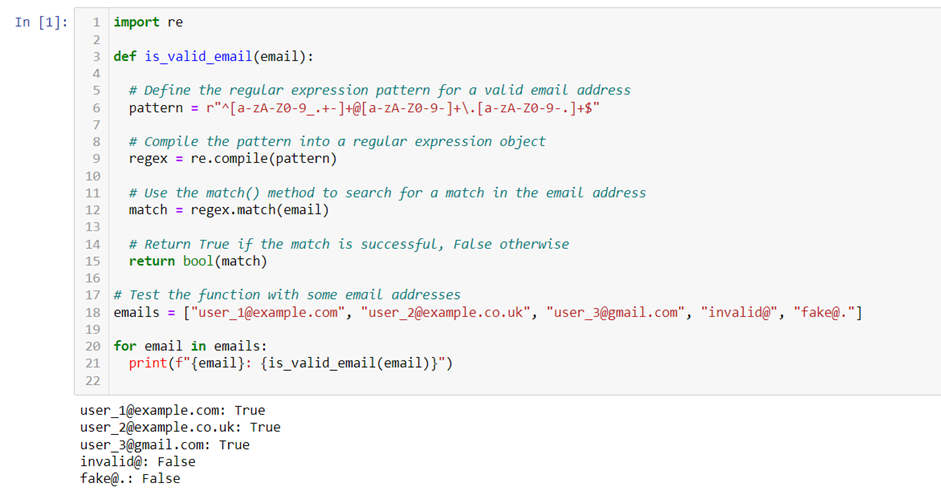
2. Extracting a phone number from a string.
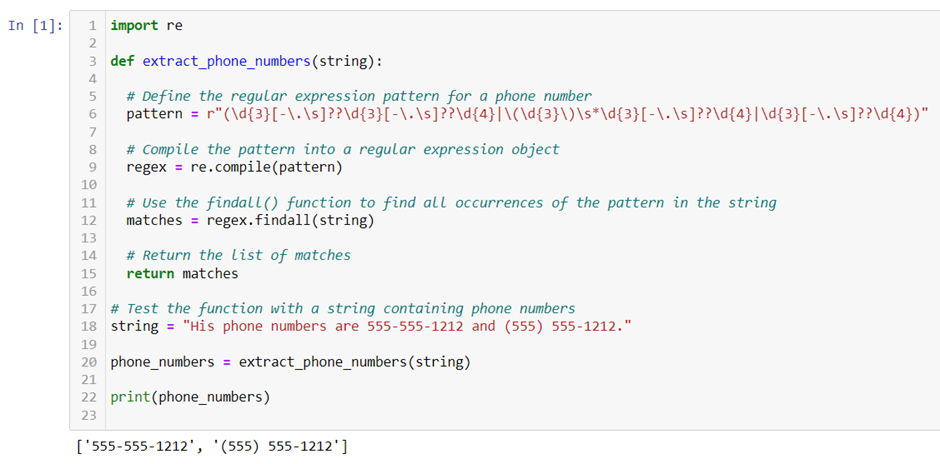
3. Extracting URL
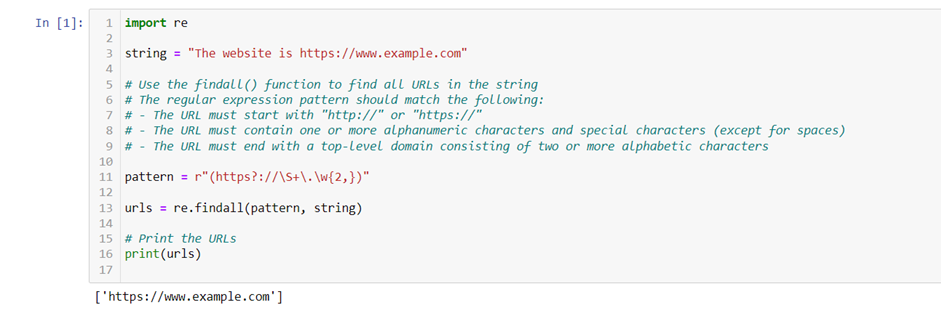
The above examples helped in understanding the Regular expression module better.
Regular expressions can be used in various applications, such as validating input data, extracting information from text files, and parsing structured data. Therefore, understanding how regular expressions work and how to use them effectively is essential to save time and effort when working with strings in Python.
Karthik Saravanan
www.linkedin.com/in/karthik-sa
Adios!