1. pd.read_csv, pd.read_excel:
The first function to mention and one of the most crucial methods of Pandas is reading csv (comma-separated value), excel files. The functions are self-explanatory. They are used to read CSV and excel files to a pandas DataFrame format.
pd.read_csv has many parameters that allow users to customize the behavior of the function.
filepath_or_buffer: The path or buffer to the CSV file to read.sep: The delimiter used in the CSV file.header: The row number(s) to use as the column names for the DataFrame.index_col: The column(s) to use as the index of the DataFrame.usecols: The column(s) to select from the CSV file.dtype: The data type(s) for the columns in the DataFrame.

pd.read_excel also has many parameters that allow users to customize the behavior of the function, including:
io: The path or buffer to the Excel file to read.sheet_name: The name or index of the sheet(s) to read from the Excel file.header: The row number(s) to use as the column names for the DataFrame.index_col: The column(s) to use as the index of the DataFrame.usecols: The column(s) to select from the Excel file.dtype: The data type(s) for the columns in the DataFrame.
Both are powerful functions used to load data from an external source into DataFrame easily. Then the DataFrame can be manipulated and analyzed using other functions in Pandas. These functions are essential tools for data analysts and data scientists who work with tabular data.

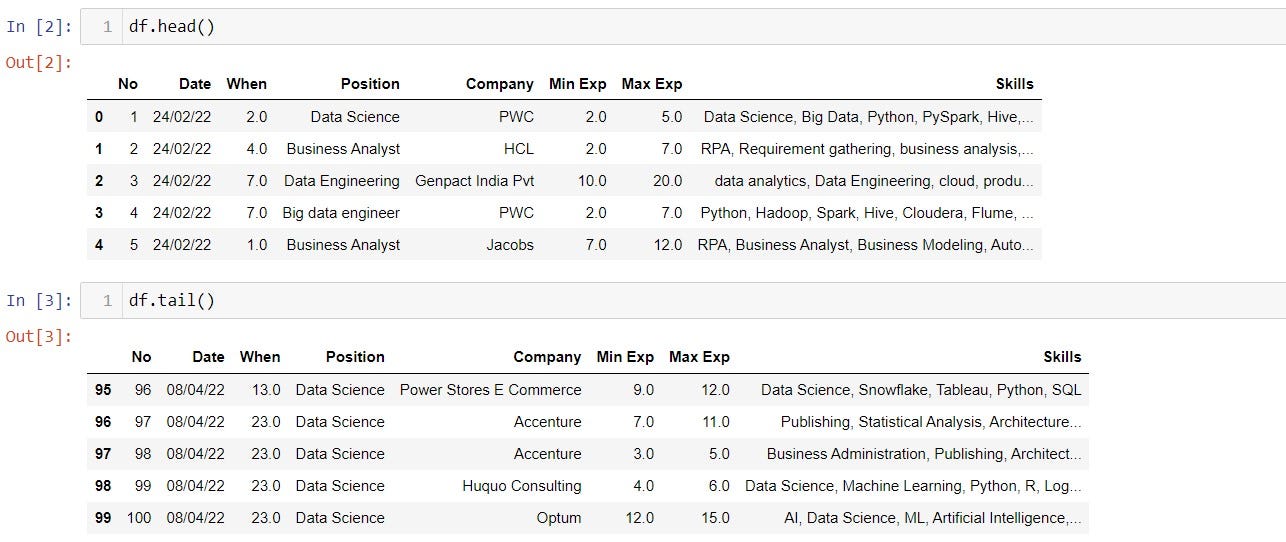
It is also common to use .head() or .tail() function after read_csv or read_excel to see the data frame. By default, it shows the first or last 5 rows of the DataFrame.
2. df.columns:
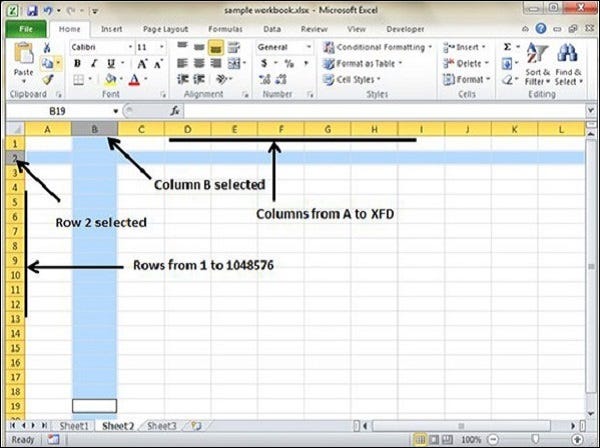
While having a big data set it will be hard to keep track of the columns. Using the df.columns attribute returns the column name/label.
- Data Type: The
df.columnsfunction returns an index object, which is a pandas data structure that is similar to a list or a dictionary. - Usage: This function can be called on a pandas DataFrame object to get a list of all the column labels. For example, if you have a DataFrame called
df, you can calldf.columnsto get a list of all the column labels indf. - Name: The index object returned by
df.columnsdoes not have a name. However, you can assign a name to the index object by setting thenameattribute of the index object. For example, you can setdf.columns.name = "Column Labels"to assign the name “Column Labels” to the index object. - Mutable: The
df.columnsindex object is mutable, which means you can change the column labels of a DataFrame by assigning a new list of labels to thedf.columnsindex object. For example, you can setdf.columns = ["new_label_1", "new_label_2", "new_label_3"]to change the column labels of the DataFrame to the new labels provided in the list. - Indexing: The
df.columnsindex object supports indexing and slicing. For example, you can get the first column label in the DataFrame by callingdf.columns[0]. - Length: The
df.columnsindex object has a length that corresponds to the number of columns in the DataFrame. You can get the length of the index object by callinglen(df.columns). - Properties: The
df.columnsindex object has several properties that provide information about the index, such asdf.columns.dtypeto get the data type of the index labels,df.columns.is_uniqueto check if all the index labels are unique, anddf.columns.nlevelsto get the number of levels in a multi-level index.
Overall, the df.columns function is a useful tool for getting information about the column labels of a pandas DataFrame and for modifying the column labels if necessary.
The df.columns attribute can be used to do many tasks, such as:
- Renaming columns: Users can assign a new list of column labels to
df.columnsand rename the columns in a DataFrame. - Filtering columns: Users can select a subset of columns from a DataFrame by indexing
df.zecolumns. - Accessing column names: Users can retrieve the column labels as a list by calling the
tolist()method on the Pandas Index object returned bydf. columns. - Checking for column names: Users can check if a particular column name is present in a DataFrame by using the
inoperator ondf.columns.

3. Shape, Size, and Info:
The most important part after reading the data is to know the number of rows and columns and to know the datatype of variables.
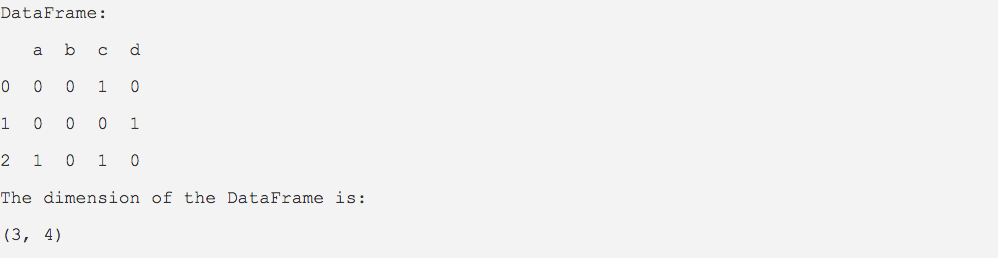
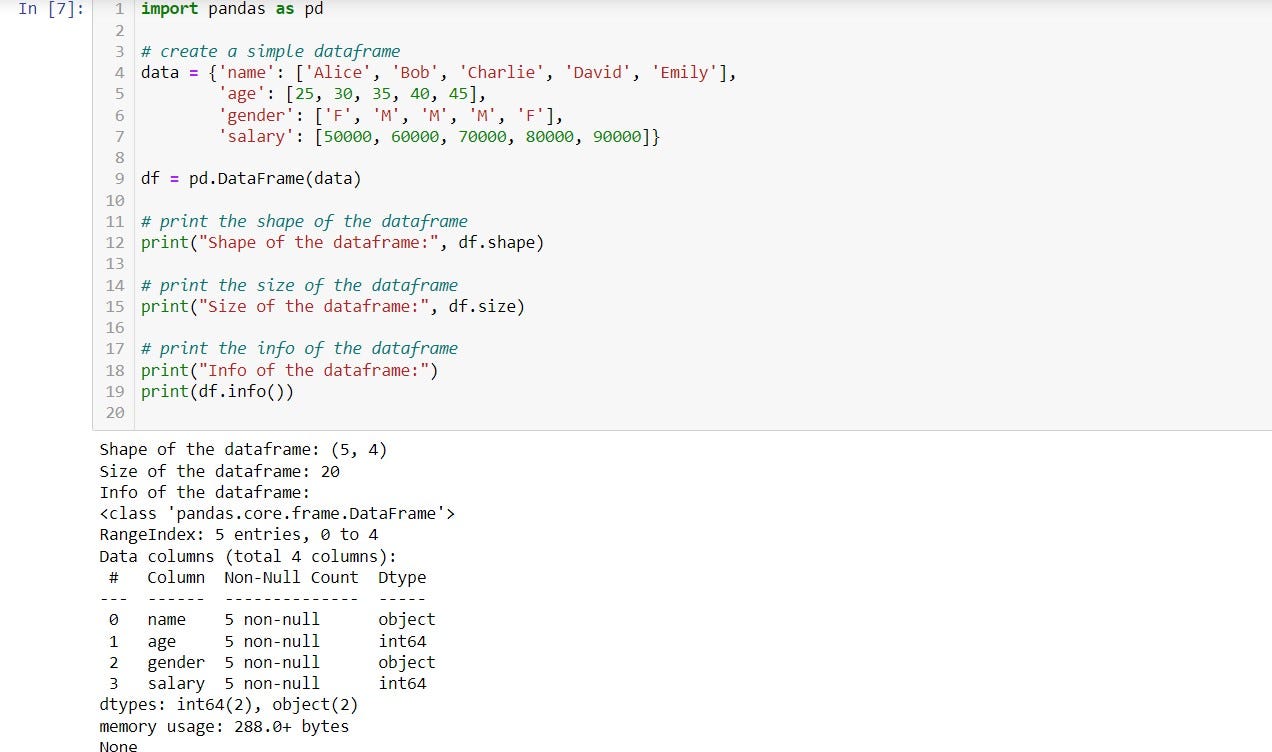
df.shape, it gives the total number of rows and then columns in a tuple format. It is mainly used to understand the size of the DataFrame and to perform operations that depend on the size of the DataFrame, such as reshaping, merging, or concatenating multiple DataFrames.
- The
shapefunction is a read-only property, which means that you cannot modify the shape of a DataFrame or Series directly using this method. - The
shapefunction is useful for determining the size of a DataFrame or Series, which can be helpful when working with large datasets. - The
shapefunction can be used to select a subset of rows or columns from a DataFrame based on their position. - The
shapefunction can be used to reshape a DataFrame or Series by changing the number of rows or columns. - The
shapefunction can be used to compare the dimensions of two or more DataFrames or Series to check if they are compatible with certain operations.
In conclusion, the shape function in Pandas is a useful tool for getting the dimensions of a DataFrame or Series and for working with large datasets.
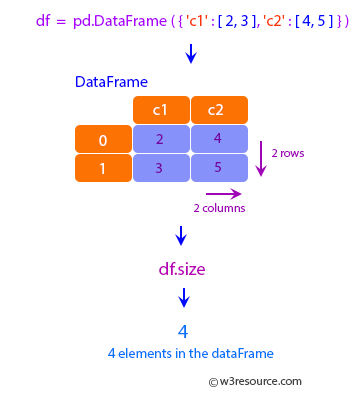
df.size() returns the total number of elements in the DataFrame, which is equal to the product of the number of rows and the number of columns. It is used to understand memory usage and perform operations like computing summary statistics.
- It returns a single integer value representing the total number of elements in a DataFrame or Series.
- The
sizefunction is a read-only property, which means that you cannot modify the size of a DataFrame or Series directly using this method. - The
sizefunction is useful for determining the total number of elements in a DataFrame or Series, which can be helpful when working with large datasets. - The
sizefunction is different from theshapefunction, as it returns the total number of elements in a DataFrame or Series, while theshapefunction returns a tuple of the number of rows and columns. - The
sizefunction can be used to select a subset of elements from a DataFrame or Series based on their position. - The
sizefunction can be used to reshape a DataFrame or Series by changing the total number of elements. - The
sizefunction can be used to compare the total number of elements in two or more DataFrames or Series to check if they are compatible with certain operations.
In conclusion, the size function in Pandas is a useful tool for getting the total number of elements in a DataFrame or Series and for working with large datasets.
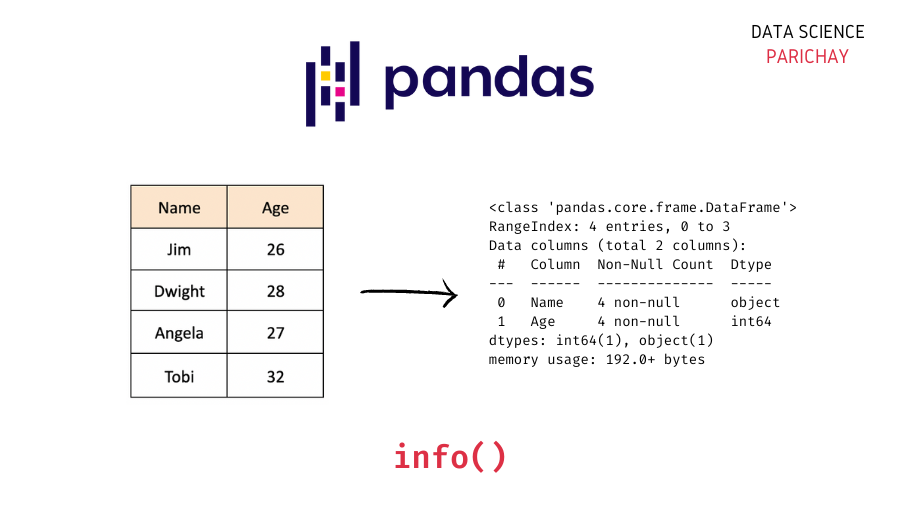
df.info(), returns information such as rows from RangeIndex, Data columns, and then the data type of each column. It also includes information on non-null counts. is useful for understanding the data types and missing values in a DataFrame, as well as for identifying potential memory issues.
- The
infofunction is useful for quickly inspecting the data contained in a DataFrame or Series, and for identifying potential data quality issues, such as missing values or incorrect data types. - The
infofunction is a read-only method, which means that you cannot modify the data contained in a DataFrame or Series directly using this method. - The
infofunction can be used to select a subset of columns from a DataFrame based on their data type. - The
infofunction can be used to convert the data type of a column in a DataFrame. - The
infofunction can be used to identify potential memory usage issues in a DataFrame, and to optimize memory usage by converting data types or dropping unnecessary columns. - The
infofunction can be used to compare the data types and memory usage of two or more DataFrames to check if they are compatible with certain operations.
In conclusion, the info function in Pandas is a useful tool for quickly summarizing the data contained in a DataFrame or Series and for identifying potential data quality and memory usage issues.
4. df.loc() and df.iloc():
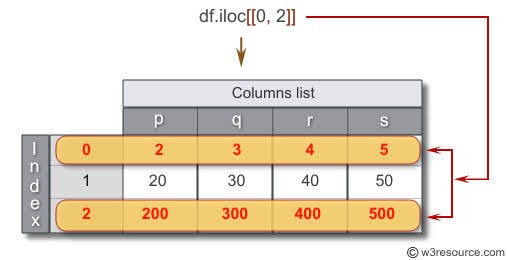
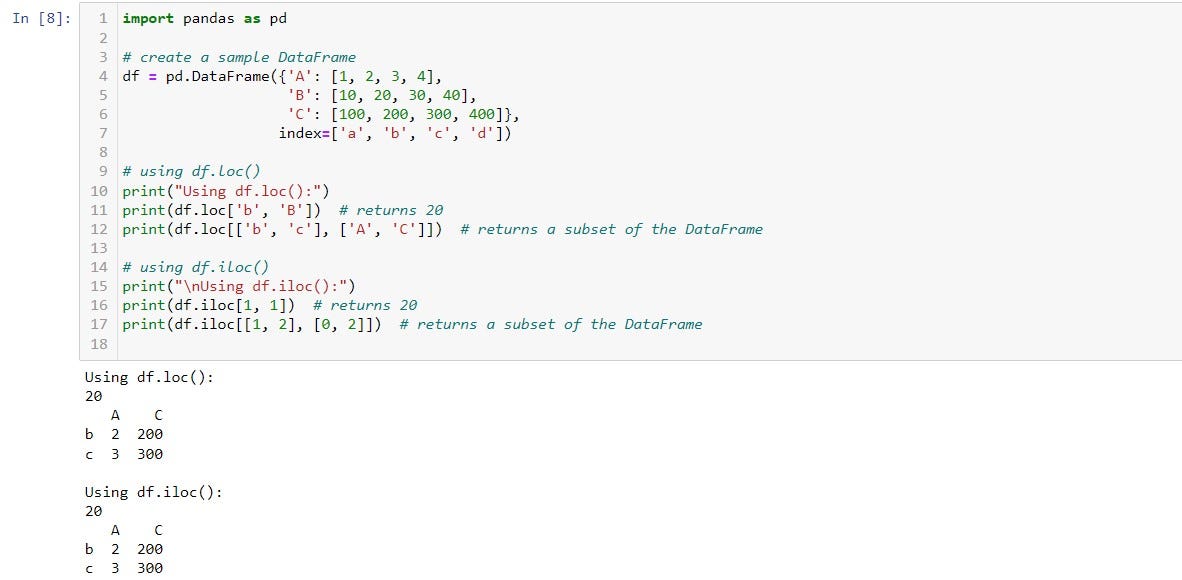
df.iloc(), is used to select rows and columns by integer position. It takes as a parameter the rows and column indices and gives you the subset of the DataFrame accordingly
- The syntax for using the
ilocfunction isdf.iloc[row_indexer, column_indexer]. - The
row_indexerandcolumn_indexercan be an integer, a list of integers, or a slice object. The:operator is used to select a range of rows or columns. - The
ilocfunction is used when you want to select data based on its position rather than its label. - The
ilocfunction is zero-based, which means that the first row or column is indexed at 0. - The
ilocfunction can be used to modify a subset of rows or columns in a DataFrame. - The
ilocfunction returns a DataFrame or Series, depending on the number of rows and columns selected. - The
ilocfunction can be used in combination with other Pandas functions such asloc,ix,at, andiatfor more advanced indexing. - The
ilocfunction is a very powerful tool for selecting, slicing, and modifying data in a DataFrame.
In conclusion, the iloc function in Pandas is a powerful method for selecting, slicing, and modifying data in a DataFrame based on its integer position. It is an essential tool for working with large datasets in Pandas.
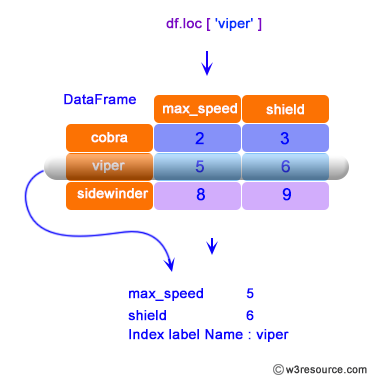
df.loc(), which is used to select rows and columns by the label. Almost a similar operation as .iloc() function. But here we can specify exactly which row index we want and also the name of the columns we want in our subset.
- The
locfunction allows for the selection of rows and columns by label or boolean indexing. - Syntax — df.loc[row_labels, column_labels], where
row_labelsandcolumn_labelsare the labels of the rows and columns that you want to select. - The
locfunction can be used with a single label, a list of labels, or a slice of labels. - The
locfunction is inclusive of both the start and end points when using a slice. - The
locfunction can also accept boolean arrays that are used to filter rows or columns. - The
locfunction returns a new DataFrame or Series that contains the selected rows and columns. - The
locfunction is commonly used for label-based indexing in Pandas. - The
locfunction is also used for assigning values to specific rows and columns in a DataFrame.
In conclusion, the loc function in Pandas is a useful tool for selecting and accessing data from a DataFrame based on its labels. It can be used with a variety of labels and boolean indexing to filter and manipulate data.
4. groupby():
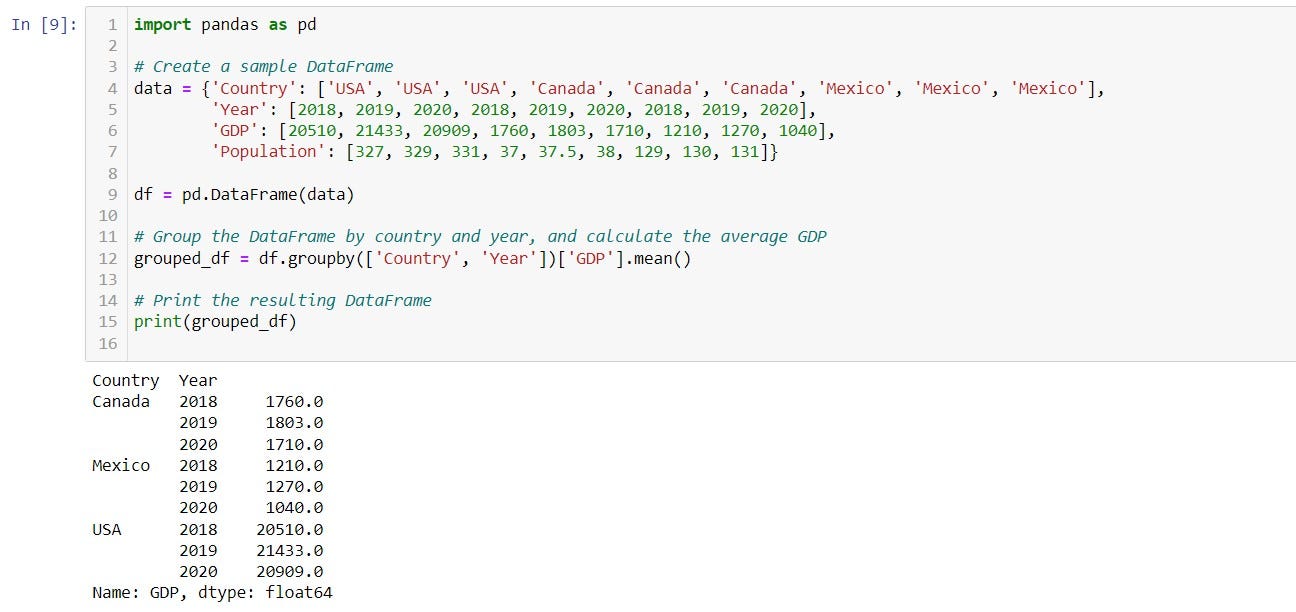
groupby() is used to group a Pandas DataFrame by 1 or more columns and perform some mathematical operation on it. This method is particularly useful for data analysis and data science tasks, where we often need to summarize or aggregate data based on certain criteria.
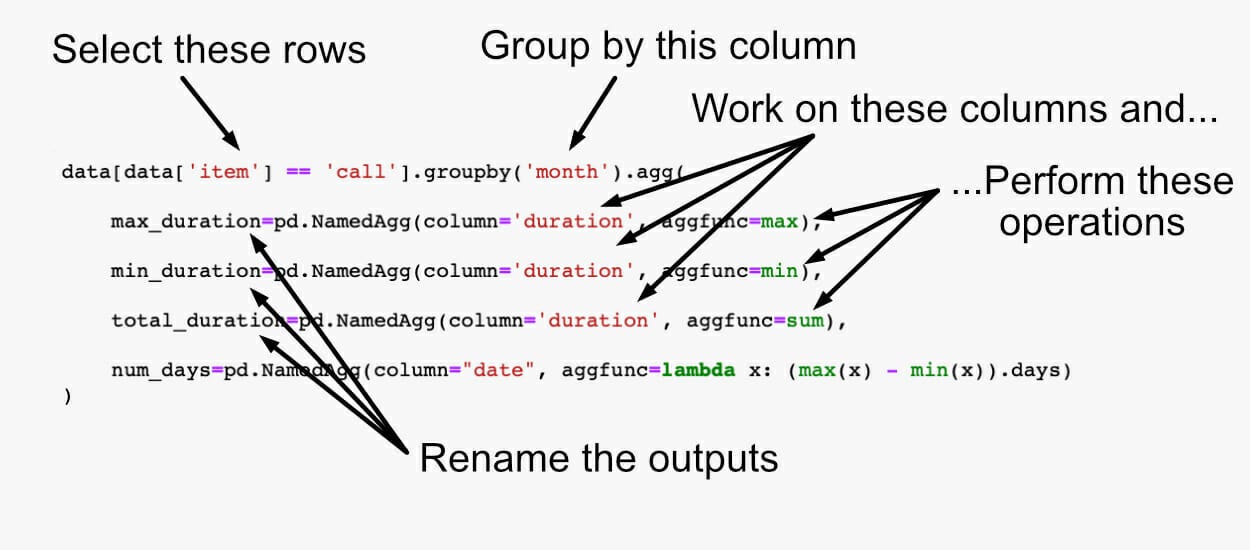
- Group the DataFrame by one or more columns using the
groupbymethod. This creates aDataFrameGroupByobject. - Apply a summary function (such as
mean,sum,count,max, ormin) to the grouped data using theaggmethod of theDataFrameGroupByobject. - Optionally, apply additional transformations or filters to the grouped data.
- The
groupbyfunction is also very flexible, and allows you to perform more complex operations such as:
- Grouping by a function or lambda expression
- Applying multiple summary functions at once
- Specifying different summary functions for different columns
- Filtering groups based on a condition
- Iterating over the groups and performing custom operations
The Pandas library is vast, containing numerous functions. However, knowing certain important functions is essential for performing most data analysis tasks successfully.
These functions are typically used in the initial stages of data preprocessing, and memorizing them is recommended.
While there are many other useful functions in Pandas, they can be explored based on specific conditions and requirements.
For further exploration, one can refer to the Pandas documentation available at https://pandas.pydata.org/pandas-docs/stable/reference/frame.html.
Hope the article was helpful.
Karthik Saravanan
www.linkedin.com/in/karthik-sa
Adios!